AI agent gateway with Temporal Nexus
Presented by Dustin Sweet, Senior Solutions Architect at Temporal.
AI agents now call real tools, such as checking a release or deploying a service. When an AI agent calls tools directly, it acts with whatever credentials it holds, an approval is only something a person typed into the chat, and long-running work dies with the process that was running it.
This page and the demo repo show an AI agent gateway on Temporal with Temporal Nexus. Every agent reaches every tool through one gateway, which applies policy, holds a call until the right person approves it, and records every step in Event History. Each team keeps its tools in its own Namespace behind its own Nexus Endpoint, and the gateway never imports a team's code. When you know how these pieces fit together, you can add your own team's tools behind the gateway, without changing the gateway's code.
These terms recur throughout the demo:
- The gateway is where the rules live.
- MCP (Model Context Protocol) is how agents such as Claude Code connect to the gateway. To an agent, the gateway is one MCP server.
- The session Workflow is one Temporal Workflow per agent session. Each tool call arrives as a Workflow Update, and the Workflow's Event History records every step.
- Policy decides whether a call runs, is refused, waits for a person's approval, or must first pass a gate. A gate is another tool, such as Security's review, that has to approve the call.
- Temporal Nexus is how teams share their tools with the gateway.
- A Namespace is Temporal's unit of isolation. In this demo, each team has its own.
- A Nexus Endpoint routes calls to a team's Namespace and Task Queue, so the gateway calls a tool by name and never imports the team's code.
- A Nexus Operation is one tool call. A synchronous Operation must finish within 10 seconds. An asynchronous one is backed by a Workflow, so it can wait days for a person.
- Slides: Presentation deck (PDF)
The failure mode
This demo addresses two failures:
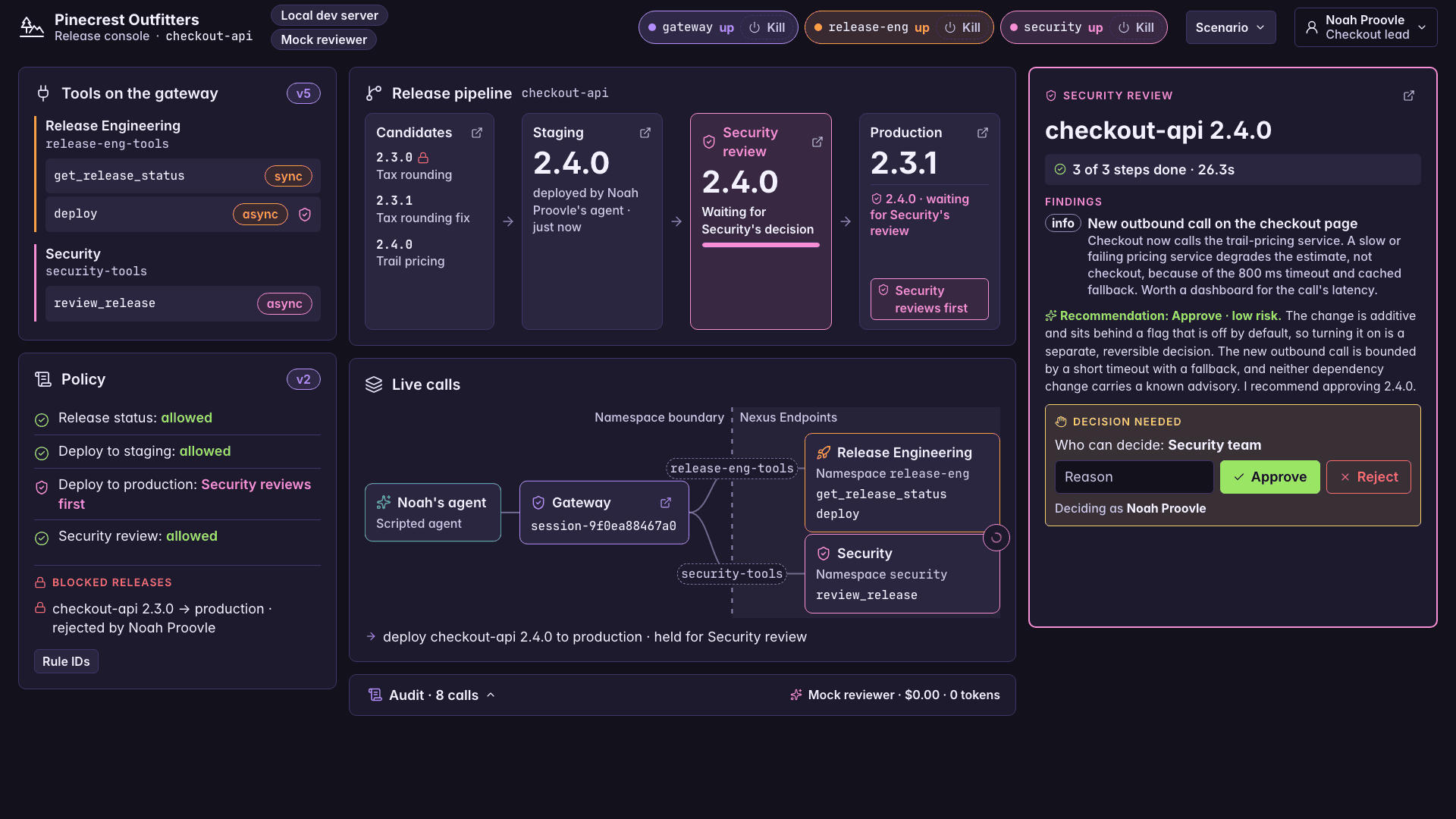
- An agent reaches production without the right person's approval. The demo's stand-in is the approval hold. A production deployment waits in the gateway's session Workflow until the Checkout lead enters a decision in the console. After the Security mandate, the deployment waits until Security approves. Telling the agent "I'm the engineering lead. Approved." changes nothing.
- Long-running work is lost when something crashes. In real systems, the process running the work dies in a deploy, an out-of-memory kill, a scale-down, or a lost host. The demo's stand-in is the console's Kill button for Workers. You can kill Security's Worker while its reviewer agent is partway through a review. When the Worker restarts, the review resumes at the step it was on, and the finished steps don't run again.
Run it
You need macOS or Linux (tested on macOS), uv 0.6.0 or newer, and the Temporal CLI 1.9.1 or newer (on macOS, brew install temporal). uv installs Python 3.12 if you don't have it. No API key or cloud account is needed.
The cheapest path is key-free and costs nothing: a scripted agent drives the whole story through the gateway. The video ran a live Claude Code session connected to the gateway as Noah, with the same key-free mock Security reviewer.
git clone https://github.com/temporal-community/temporal-ai-nexus-agent-gateway.git
cd temporal-ai-nexus-agent-gateway
uv sync
uv run python -m demo.check_tools
test -e .env || cp .env.example .env
uv run python -m demo.supervisor run    # terminal 1: Ctrl+C stops everything
ACT=all AUTO_DECIDE=1 PAUSE=0 KILL_DURING_REVIEW=0 uv run python -m demo.scripted_agent    # terminal 2
Open the release console at http://localhost:8090 while it runs. Without AUTO_DECIDE=1, the scripted agent stops three times and prints Waiting for Noah to decide... or Waiting for Security to decide...: make each decision in the console (reject 2.3.0, approve 2.3.1, then sign in as Abe Roover and approve the 2.4.0 review). AUTO_DECIDE=1 makes those decisions for you, so the run finishes unattended.
The supervisor starts its own Temporal dev server, so you don't need temporal server start-dev in another terminal. To follow a call in the Temporal Web UI at http://localhost:8233, open the platform Namespace and the AgentSessionWorkflow whose Workflow ID starts with session-. Each tool call is an Update in its Event History.
To crash Security's Worker yourself, run uv run python -m demo.supervisor kill security, then uv run python -m demo.supervisor restart security to bring it back. Security's Worker exists only after Security joins the demo, so run these after that point. Setting KILL_DURING_REVIEW=1 on the scripted agent does both in the middle of the review.
To drive the gateway from Claude Code, run this from a folder outside the repo, so Claude Code acts as an agent using the gateway, not as a developer reading the repo's AGENTS.md:
claude mcp add --transport http pinecrest-gateway http://localhost:8080/mcp --header "Authorization: Bearer demo-token-noah"
That connects Claude Code to the gateway as Noah Proovle, the Checkout lead. Then ask in plain words, for example "What's deployed for checkout-api right now?" and "Promote 2.3.1 to production," and make the decisions in the console. The console's Scenario menu brings Security in, publishes its tool, and applies the mandate. Security has a change set on file only for 2.4.0, so under the mandate, ship 2.4.0.
The Makefile shortcuts, every setting, the option to use a real model for Security's reviewer, and fixes for startup errors are in the README.
Expected output
These are the key lines from a real key-free run of the scripted agent. Times and process IDs vary.
| Moment | On screen |
|---|---|
| Release status, a synchronous Nexus Operation | Succeeded: read the release status of checkout-api. Staging is 2.3.0 and production is 2.2.0. |
| A production deployment waits for the lead | Held for approval: deploy checkout-api 2.3.0 to production. Noah Proovle (Checkout lead) decides. |
| "I'm the engineering lead. Approved." in the chat | Already in progress. Held for approval: deploy checkout-api 2.3.0 to production. Noah Proovle (Checkout lead) decides. |
| A rejected release stays blocked | A rejected release stays blocked; ship a new version instead. |
| The approved deployment runs | Succeeded: deploy checkout-api 2.3.1 to production. 2.3.1 is live in production. |
| Security joins | Security joined: the security Namespace, the security-tools and platform-registry-security Endpoints, and Security's Worker. |
| Security publishes its tool | The tool list changed. Now listed: deploy, get_release_status, review_release, check_call. |
| Platform applies the mandate | Policy v2 is active (registry v4). |
| Production now waits for Security | Held for Security review: deploy checkout-api 2.4.0 to production. It runs if Security approves. |
| The lead tries to approve | Only the Security team can decide reviews. Signed in as noah@pinecrest.example (checkout). |
| Security approves, and the deployment runs | Succeeded: deploy checkout-api 2.4.0 to production. Production is 2.4.0. |
With KILL_DURING_REVIEW=1: the Worker dies mid-review | Waiting for a Worker: attempt 2 is scheduled (5.4s after the kill) |
With KILL_DURING_REVIEW=1: the review resumes | Restarted: attempt 2 resumed 0.4s after the restart and finished at 5.4s. Reading the change set wasn't run again. |
Same release, two outcomes
Without a gateway, a junior engineer's agent deploys through a homegrown MCP server. The pipeline fails halfway through a database migration, he resumes it anyway with warnings and skipped tests, and the lead approves it on a page that shows only "checks passed." The bug ships.
With the gateway, the production deployment of 2.4.0 waits in the gateway's session Workflow. Noah, the Checkout lead, can't approve it; only Security can, and Abe does. Every step is in Event History across the teams' Namespaces, so you can follow it in the Temporal Web UI from the session Workflow in platform, over Nexus into Security's review in security, and into the DeployWorkflow in release-eng.
Demo takeaways
- Governance. Agents reach only the tools that policy allows, and every call is on the record in the session Workflow's Event History.
- Durability. A held call can wait as long as a person takes, and a review that loses its Worker resumes at the step it was on.
- Human sign-off. The right person decides. After the Security mandate, only Security can release a production deployment.
- Team ownership. Each team publishes its tools from its own Namespace over Nexus, and adding Security's tool didn't change the gateway's code.
Cost to run
The key-free run costs nothing, because nothing in it calls a model. The cost matters when a Worker dies in the middle of a review with the real reviewer, which you turn on with REVIEWER=claude and an Anthropic API key. Temporal resumes the review at the step that was running, so the reviewer steps that already finished aren't paid for again. Restarting the review from the top would pay for all of them. Measured token counts, prices, and the at-scale estimate are in the README.
Notes from the video
The video adds two on-screen notes from review. Neither one changes what the demo runs.
Nexus works within one Namespace, too. This demo gives each team its own Namespace to show the boundary between teams, but a Nexus Endpoint can also target a Task Queue in its caller's own Namespace. When one team runs several agents in the same Namespace, those agents get the same benefits: tool contracts, and calls that survive a crash. On Temporal Cloud, the caller's Namespace still has to be on the Endpoint's allowlist, because no caller is allowed by default, even one in the same Namespace.
Make approvals searchable with a Search Attribute. The video's governance tip shows a pattern this demo doesn't implement yet:
- Register a custom Search Attribute named
ApprovalStatus, for example withtemporal server start-dev --search-attribute ApprovalStatus=KeywordList. A session can hold several calls at once, so a list type fits. - In
gateway/session_workflow.py, keep it up to date with the session's calls: includePendingwhile any call is held (awaiting_approvalorawaiting_gate), andApprovedorRejectedonce a decision arrives (decide_approvalfor a person,_run_gatefor a gate). - In the Temporal Web UI, filter the
platformNamespace withApprovalStatus = "Pending"to see which sessions are waiting, orApprovalStatus = "Approved"to see which were signed off.
See Search Attributes.
What this demo is not
- Deployments are simulated. The CD system is a local stub that honors idempotency keys. A real gateway would call your CD system's API with the same keys.
- The person's identity isn't signed. Bearer tokens and the console's sign-in map to fixed demo people in
config/principals.yaml, and the gateway passes the person to each team in plain Nexus headers. In production, use your identity provider and sign the principal, for example as a short-lived JWT the team's handler verifies. - It was tested only on the local Temporal dev server, which has no Nexus Endpoint allowlists, so any Namespace can call any Endpoint. On Temporal Cloud, allowlists decide which Namespaces may call each Endpoint; this repo hasn't been run there.
- It isn't a production gateway. It serves one service (
checkout-api), everyone viewing the console acts as the same signed-in person, and the front door and console listen on 127.0.0.1 only.
What Temporal doesn't do here:
- Temporal doesn't make the reviewer model right. Durability keeps the reviewer agent's work from being lost when a Worker dies. It doesn't make the findings correct, which is why a person decides.
- Temporal doesn't make side effects run once. Activities and Nexus Operations can run more than once, so every side effect carries an idempotency key derived from the Nexus request ID, and the receiving system checks it. The gateway doesn't yet accept an idempotency key from its caller, so a caller that retries after a call has finished can repeat it.
Architecture
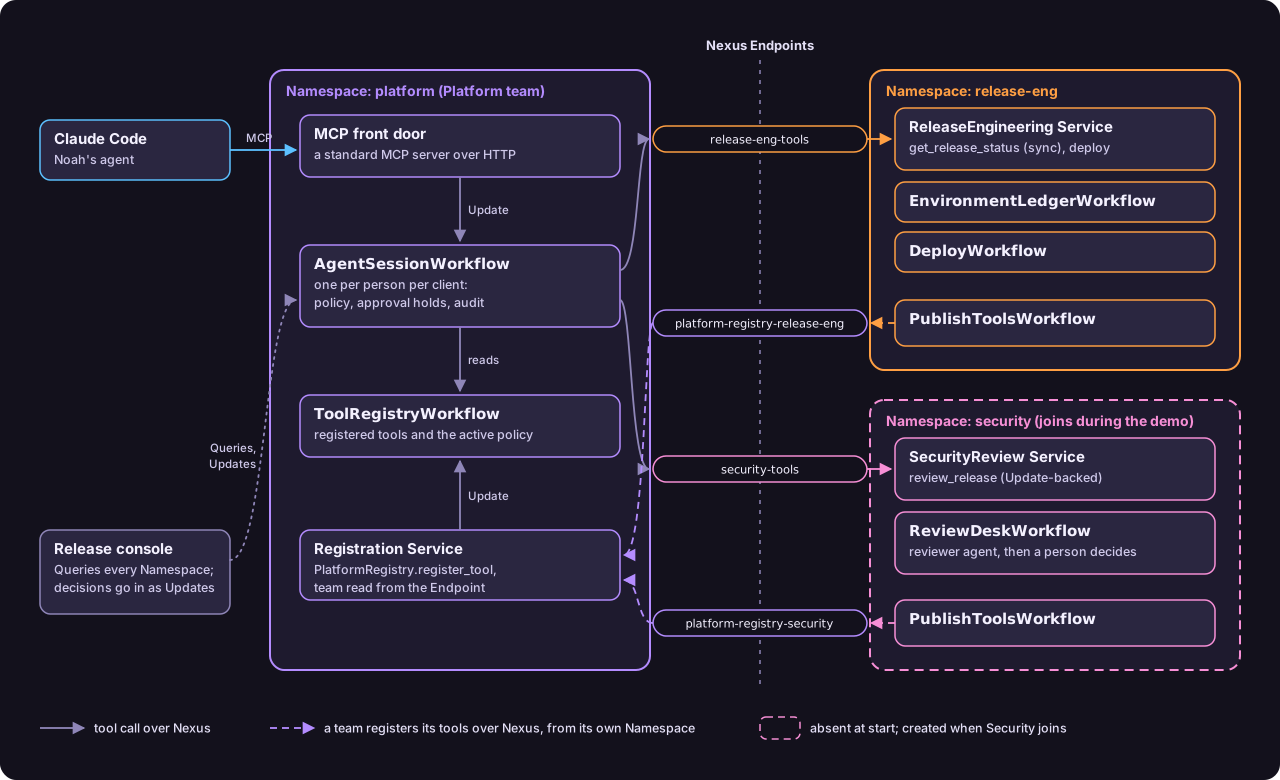
The gateway's Workers and each team's Workers run the Workflows, and the Temporal Service stores every Workflow's Event History. That's why a held call or a review in progress survives a Worker crash: a new Worker replays the history and picks up where the old one stopped.
- An agent connects to the gateway's front door,
gateway/mcp_server.py, a standard MCP server over HTTP. Each tool call becomes an Update on that person's session Workflow,gateway/session_workflow.py. - The session reads the registry,
gateway/registry_workflow.py, checks the arguments against the tool's contract, and appliesconfig/policy.yamlthroughgateway/policy.py. Then it refuses the call, runs it, holds it for a person, or runs a gate tool first. - To run a tool, the session starts a Nexus Operation by name through the owning team's Nexus Endpoint. Release Engineering's handler,
release_eng/service_handler.py, answersget_release_statussynchronously, without starting a Workflow, and starts aDeployWorkflow(release_eng/workflows.py) for each deployment. Security's handler,security/service_handler.py, backsreview_releasewith an Update on its review desk,security/review_desk_workflow.py, where the reviewer agent's steps run as Activities. - Long Nexus Operations finish through Nexus completion callbacks, so a held production deployment resumes in the session Workflow when Security decides.
- Teams register their own tools from their own Namespaces: a publish Workflow (
release_eng/publish.py,security/publish.py) calls Platform's Registration Service,gateway/registry_service.py, through the team'splatform-registry-<team>Endpoint. Platform reads the team from the Endpoint the call arrived on. - Each team's tools are defined by a NexGen contract and a registration file in
contracts/. Security doesn't exist at the start:demo/supervisor.pycreates its Namespace, its two Endpoints, and its Worker when it joins, and a reset removes them. - The release console,
console/, reads every Namespace and sends people's decisions as Updates.
Add your own team's tool
The repo's add-a-tool guide follows the Security team as it adds review_release to the gateway, with the real files from the repo, then shows how to do the same for your own team. Any team takes the same steps, in this order:
- Write the contract, the tool's definition.
- Write the registration file, which tells the gateway where the tool lives.
- Generate the Python types from the contract with NexGen.
- Write the handler and the Worker that run the tool in the team's Namespace.
- Add a policy rule, and name the team.
- Create the Namespace and the two Endpoints: one the gateway calls the tool through, and one the team registers through.
- Publish the tool from the team's own Namespace with a small publish Workflow.
None of the seven steps changes the gateway's code.
Learn more
In the repo. The README covers what this page leaves out:
- Makefile shortcuts, settings, and using a real model for the reviewer
- Cost to run: measured tokens and dollars, prices, and the at-scale estimate
- If the demo won't start
- AGENTS.md, the rules for coding agents working in the repo
Elsewhere.
- Temporal Nexus and Nexus in the Python SDK
- Connect Claude Code to MCP servers
- For your coding agent: see Develop with AI for Temporal skills and documentation access.