Agent memory and state
As agents run longer and take on more complex work, how they handle memory and state starts to matter. An agent that loses its place partway through a task can leave a customer repeating themselves, or leave a job half done. Managing that well starts with knowing the difference between an agent's memory and its state.
This page and the demo repo step you through that difference. An agent works with different kinds of information, and the demo explains several of them:
- Memory: what the agent knows as part of its own system. Memory comes in
two flavors, depending on the longevity of the data:
- Context: what the agent has in front of it for the current decision: the request, the conversation so far, and the results of its last steps. The model reasons only on what's in context, so what goes in, and what's left out, shapes every choice it makes. It's sometimes called working memory.
- Long-term memory: what the agent carries from one run to the next. Memory comes in many types, such as past cases (episodic), facts (semantic), and how-to instructions (procedural). It lives in a store you own, and the agent pulls from it into context when it needs it.
- State: the facts the agent relies on but doesn't own, each kept by the
system that owns it. State comes in many types, such as execution,
authorization, effect, and domain state, and this demo shows two of them:
- Execution state: where the work stands, meaning which steps are done and what comes next. Temporal records it in Event History, outside the agent's process, so a new process can pick the work back up.
- Effect state: whether an action in the outside world, such as a refund, actually happened. The system that performed it, Stripe in this demo, is the source of truth.
When you know what context, long-term memory, and state are for an agent, you can build agents that run longer and take on more complex work. The demo stops the same agent mid-task twice, once without Temporal and once with it, so you can see where each kind of information lives and which ones survive a crash. A memory store can bring back what an agent knew, but it can't tell a new process where the work stood or whether the last action went through. That's the job of state.
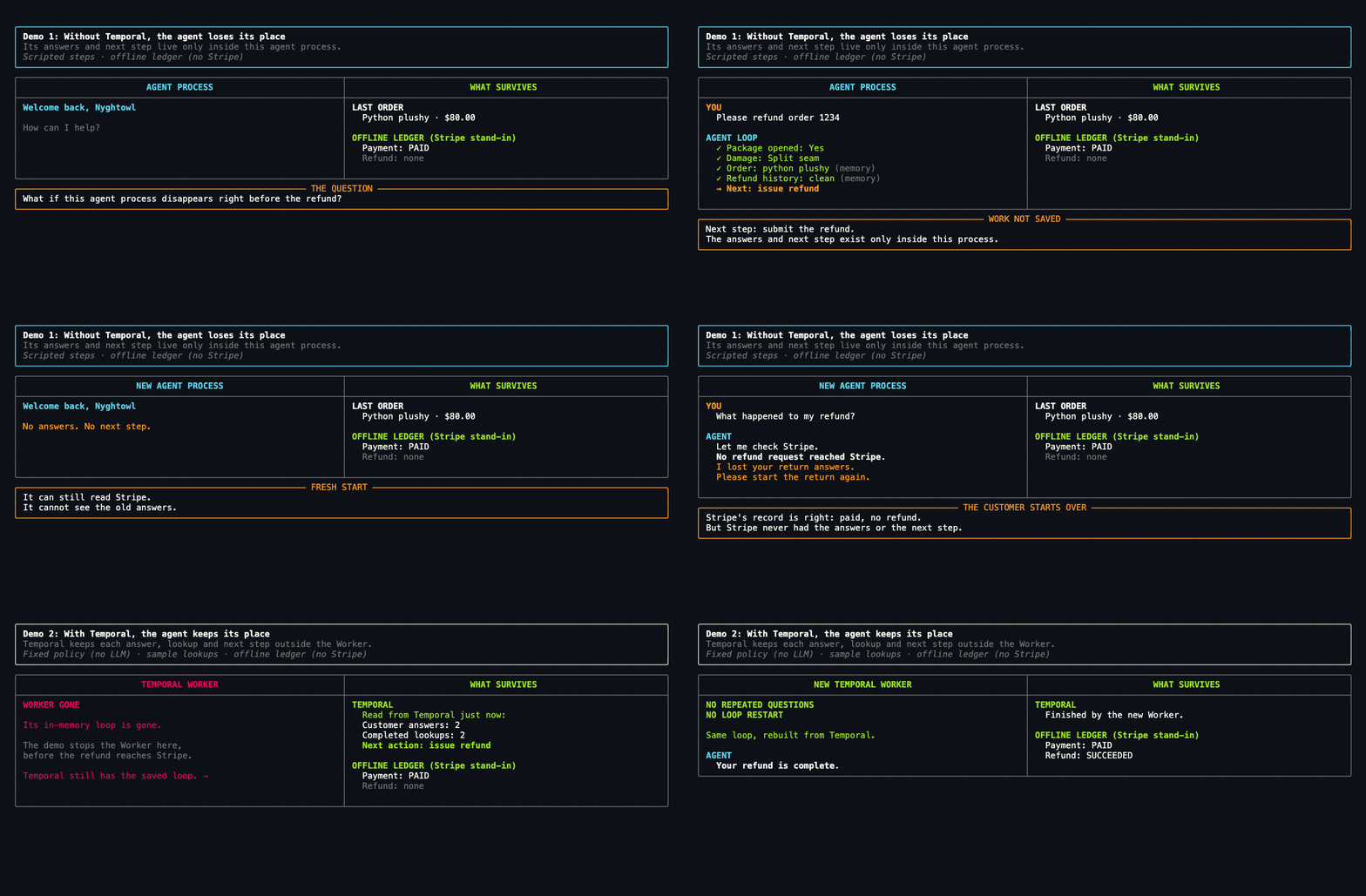
The demo shows what happens to an AI agent's in-flight work when its process
dies. It kills a customer-support refund agent one step before it refunds the
customer. By then the agent has asked two questions, looked up the order and
the customer's refund history, and chosen issue refund.
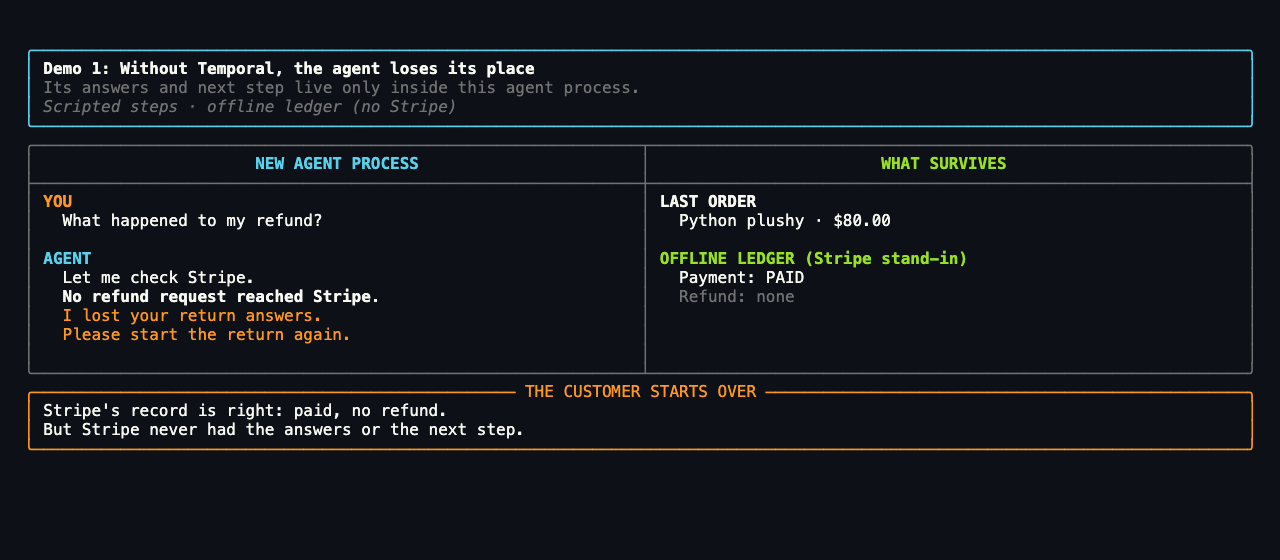
- Demo 1, without Temporal: that progress dies with the agent process, and the customer has to start the return again. The failure mode is lost loop position.
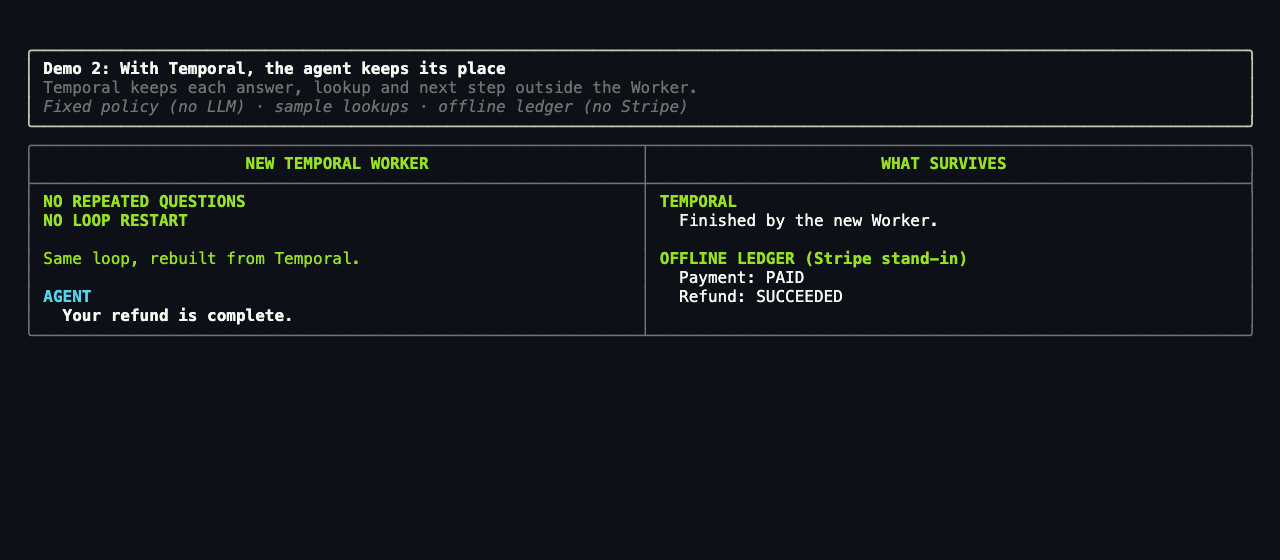
- Demo 2, with Temporal: the same loop runs as a Temporal Workflow. A new
Worker rebuilds it from Event History and resumes at
issue refundwithout repeating a question.
The agent is a hand-written Python loop with no agent framework, so Temporal's role is easy to see: it records the execution state outside the agent's process. A new process can then pick up the work.
- Slides from the video: Agentic Memory and State, October 2026 (PDF)
- Slides from the TAI meetup: Agentic Memory and State, in English and Japanese (PDF)
Last verified: 2026-10-26 (live model and Stripe test mode, offline demo, tests). Failure path: 2026-10-06.
Run it
You need:
- Python 3.11+
- uv, tested on 0.11.8
- the Temporal CLI, tested on 1.6.2
Keys: the default run is live, so it uses a model key (OpenAI or
Anthropic) and a Stripe test key from .env. If one is missing, the demo asks
for it for that run only, or you press Enter to run offline. Add --offline to
skip the keys entirely.
git clone https://github.com/temporal-community/temporal-ai-agent-memory-state-stripe.git
cd temporal-ai-agent-memory-state-stripe
uv sync --extra dev --extra tui
test -e .env || cp .env.example .env   # keeps an .env you already have
uv run refund-demo stage               # fullscreen; press Enter at each prompt
The key lines below show what you should see. To follow each step side by side, see what the runner does. Every flag and frame is in GUIDE.md.
Watch it in the Temporal Web UI at http://localhost:8233. The demo uses
the dev server at localhost:7233 and starts its own if none is running. When
the demo exits, it stops any server it started, Web UI included, so if you want
the Web UI to stay open, run temporal server start-dev in another terminal
first.
Open the RefundApprovalAgent Workflow. Its Workflow ID is
talk-refund-<token> by default, with a new token on every run. After the
kill, the Workflow shows Running even though no Worker is alive. That is
expected: the Workflow's progress is recorded in Event History, which lives in
the Temporal Service, and the Workflow waits there for a new Worker to pick it
up. The guide shows
how to find it and what to check at each frame.
Live and offline paths. The default run uses a live model and Stripe test
mode when the keys are set, and asks for any that are missing. When no one is at
the terminal to answer, it runs offline. --offline always runs offline, with a
fixed policy in place of the model and an offline ledger in place of Stripe. To
pick one live service, pass --real for Stripe test mode, which needs a
sk_test_ or rk_test_ key (the demo rejects live keys), or --real-model for
a live model, with --model-provider openai or anthropic and the matching API
key. The video ran the default run with OpenAI and a Stripe test key. Make
targets, model settings, unattended runs, and cleanup are in the
README. If the demo won't start, see
Troubleshooting.
Same crash, two outcomes
Processes end mid-task for ordinary reasons. In production, a deploy, a crash, an out-of-memory kill, a scale-down or eviction, or a lost host or network can stop an agent partway through its work. The demo stands in for all of them with a real SIGKILL.
Both demos stop the same agent right after it chooses issue refund, before the
refund reaches Stripe. Only Demo 2 resumes: its new Worker "picks up from the
next step it was supposed to take in that loop, which is to issue the refund,"
as the video puts it.
What you'll see in a default run (full transcript):
| Moment | Demo 1: without Temporal | Demo 2: with Temporal |
|---|---|---|
| The agent picks its next step | → Next: issue refund | Next action: issue refund |
| The process stops before Stripe | PROCESS GONE | WORKER GONE |
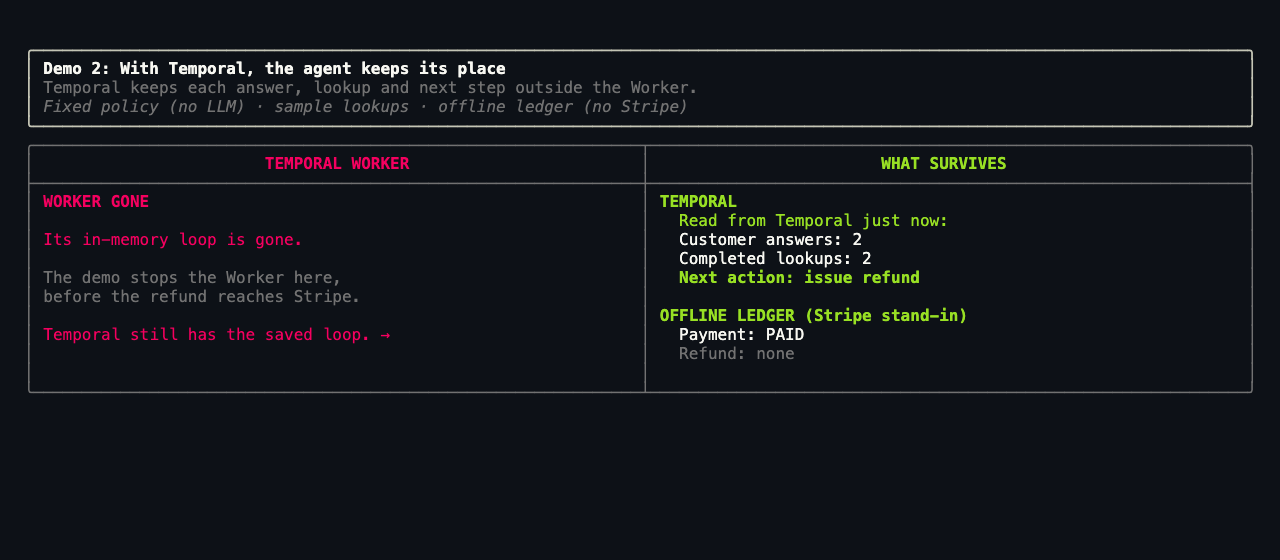
| What's left | Stripe: paid, no refund. The new process: No answers. No next step. | Read from Temporal just now:2 customer answers, 2 completed lookups, Next action: issue refund |
| How it ends | No refund request reached Stripe.Please start the return again. | NO REPEATED QUESTIONSNO LOOP RESTARTYour refund is complete. |
| Demo 1: without Temporal | Demo 2: with Temporal |
|---|---|
 |  |
Between the kill and the new Worker, Demo 2's WORKER GONE frame reads Event
History. Event History lives in the Temporal Service, so reading it needs no
Worker:
What's written for the demo
The code follows the patterns you'd use in a real app, plus a few demo-only hooks so you can watch recovery happen at a predictable moment.
- A pause before the refund. The Workflow waits for a
releaseSignal right beforeissue_refund. The demo stops the Worker during that pause, so the crash lands at the same point on every run. After a new Worker starts, the demo sendsreleaseand the refund goes through. A real app has no pause: its Worker can stop at any step, and Temporal recovers the same way. The flag ishold_before_effectinRefundRequest(models.py). - A real crash. Each stop is a real SIGKILL, with no clean shutdown.
- Answers carried over. Demo 1's answers go into Demo 2 as Signals, so you don't type them twice. Demo 1's new agent process never gets them.
- Two scripted questions. The agent always asks the same two questions first (was the package opened, and what was damaged), even with a live model, so every run reaches the crash at the same point. After that, the model chooses its own lookups and decision.
- Sample data. The lookups read a small SQLite store (store.py) seeded with one order and one customer. A real app reads its own systems.
- Offline stand-ins. With
--offline, a fixed policy stands in for the model, so the run makes no model calls (0 tokens, $0), and an offline ledger stands in for Stripe. The default run uses a live model and Stripe test mode. - Failure drills. Two optional runs stop the Worker in the middle of the
refund Activity:
uv run refund-demo stage --offline --simulate-stripe-timeouthas no pause. Attempt 1 ofissue_refundhangs before it reaches Stripe, and the demo stops the Worker. A new Worker runs attempt 2 with the same idempotency key.--simulate-stripe-retrykeeps the pause. Afterrelease, it stops the Worker again after Stripe accepts attempt 1 but before Temporal records it. Attempt 2 reuses the idempotency key, so the two calls make one refund.- On these two drills,
fast_recoverycuts the refund Activity's heartbeat timeout from 15 s to 3 s, so Temporal notices the lost Worker within seconds. The same flag gives every guided run a 6-minute start-to-close timeout for that Activity instead of 1 minute.
The loop, the Activities, the retries, and the idempotency key are written as you would write them for a real app. Comments in models.py, workflow.py, activities/model.py, activities/refund.py, and stage.py mark each demo-only hook.
The Workflow ID, which Stripe lines read Stripe, and what Demo 1 gets right
- Why a real app needs the Workflow ID. The runner holds the Workflow ID for you. A real app must keep or derive it, because a restarted application needs it to find the run and read its result.
- Which Stripe lines read Stripe. Not every Stripe line on screen comes from Stripe. The guide lists which do.
- What Demo 1 gets right. Memory and Stripe are both useful, and Demo 1 isn't wrong to rely on them. After the crash, Stripe's record is correct: the payment is paid and has no refund. What Demo 1 lacks is any record of where its own work stood, so its new process can't continue the task.
Context, memory, and state
These are the key ideas from the video and its slides.
Agents are loops. On each turn, the model reasons on what it has seen so far, then acts through a tool call, a write, or a message. The result goes back into context for the next turn, and the loop repeats until it reaches a goal, a stop condition, or a failure. The more autonomy an agent has, the more of its path it chooses at runtime, so you can't lay out every step ahead of time. We're also giving agents harder work, such as writing code, creating tools, and even improving themselves. That makes an agent a long-running, complex system, and it needs context, memory, and state to do that work well.
Context is what the model reasons on, and it's the only one of the three that lives inside the loop. It grows every turn, but the context window is only a buffer. Preparing what goes into it is what makes it act like working memory. These are the common ways to manage it:
- Stuff the window puts everything in the prompt.
- Truncate drops the oldest turns.
- Compact summarizes old turns. It's today's default.
- Retrieve brings in what's needed through RAG, memory files, or memory tools.
- Bigger windows of a million tokens have already shipped.
- Self-curating context, still emerging, lets the agent edit its own context.
Memory comes in many kinds, and each one lives somewhere different:
- Working memory is like a whiteboard: what's active for the current decision. For an agent, that's its context.
- Episodic memory is like a diary: past experiences and events, kept in run logs and transcripts.
- Semantic memory is like an encyclopedia: facts as the agent recalls them, kept in a vector store or a knowledge base.
- Procedural memory is like a recipe: skills and how to do things, kept in skill files and tool definitions.
- Parametric memory is what the model already knew from training. It's in the weights, and you can't edit it while the agent runs.
Episodic, semantic, and procedural memory together make up long-term memory. A long-running agent can't keep everything in its window, so it pulls in only what each decision needs. A refund skill, for example, waits in a skill file until a refund comes up. Memory helps the agent decide, but it can be out of date.
Context and memory cover what the agent knows, not where the work stands. State is about who owns each fact the agent relies on, and each owner is a system of record. State comes in many types, such as execution state, authorization state, effect state, and domain state. The demo shows two of them:
- Execution state is where the work stands, and Temporal records it. After the crash, a new Worker replays Event History and runs only the refund.
- Effect state is whether the refund actually happened, and Stripe owns it.
Every retry sends the same idempotency key, so Stripe makes one refund. In
Temporal's terms, Stripe is the source of truth for the effect, the
issue_refundActivity result is the Workflow's record of it, and the idempotency key reconciles the two when a crash lands in between.
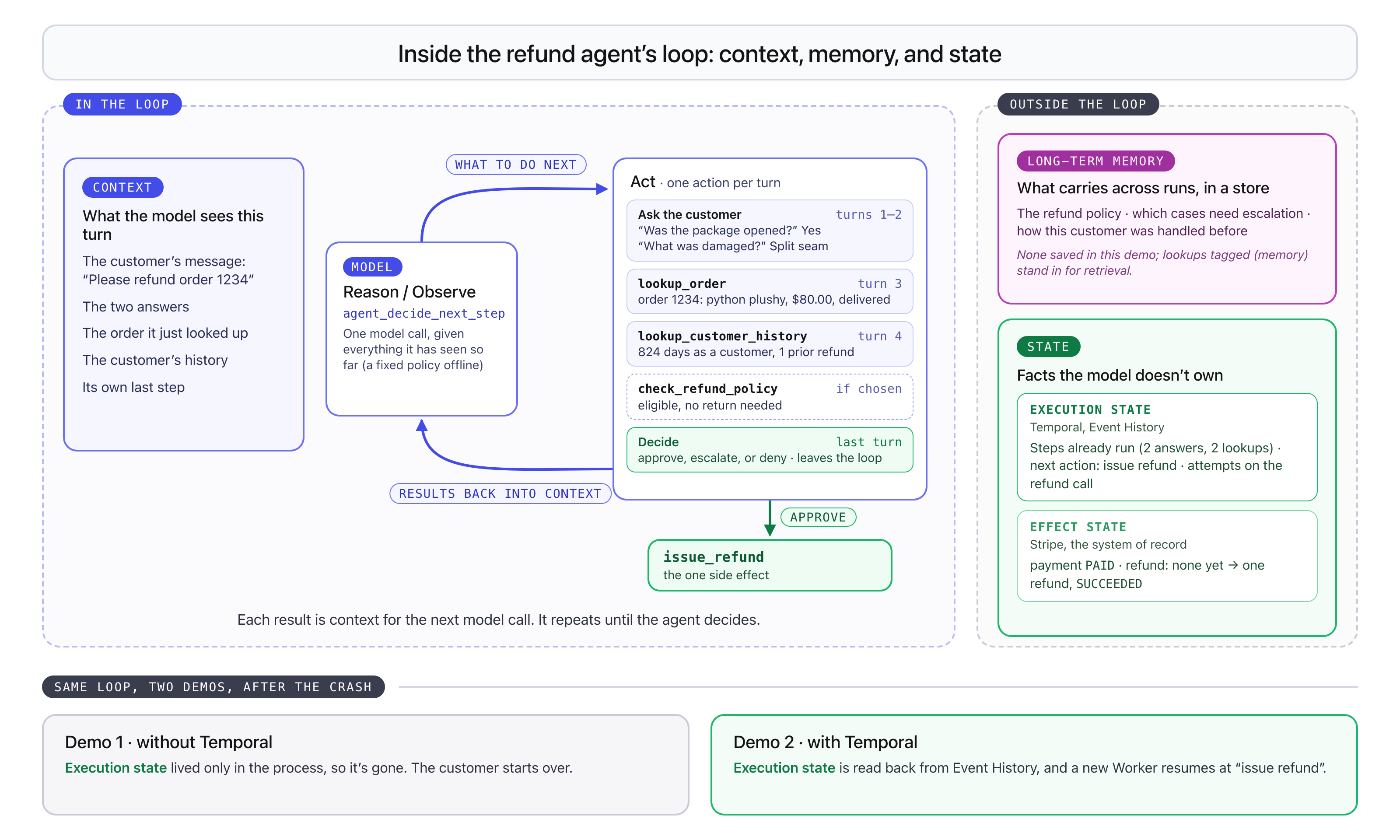
The diagram places each kind of information around the demo's agent loop. It
was drawn before the demo added its case note, so it shows no long-term memory
saved. remember_case now saves a short note after the refund, as the table
shows. The table lists what each kind of information is in this demo and where to
find it.
| What it helps with | In this demo | Where to find it | |
|---|---|---|---|
| Context (working memory) | What the model sees for this one decision. The loop sends it again on every turn | The customer's refund request, their two answers, and what the agent has looked up so far: order 1234 and the refund history of the demo customer, Nyghtowl | working_memory.Demo 1: a list in the agent process ( naive_refund.py).Demo 2: a Workflow field ( workflow.py) that replay rebuilds.In Event History: the input of each agent_decide_next_step Activity |
| Long-term memory (a memory store) | What the agent carries across runs: Episodic: past cases. Semantic: facts it looks up. Procedural: how-to, such as skill files and tool definitions | A light version. After the refund, remember_case saves a short case note to the demo's SQLite store, and lookup_customer_history reads notes back as past_cases on later runs.Each guided run starts from fresh data, so the demo plays the same way every time. Each lookup result becomes part of context once the agent reads it | Your store: a vector store, a knowledge base, or memory files. Here: store.sqlite in the run's state folder |
| Execution state | Where the work stands: which steps finished and what runs next, so the work can continue after a crash without redoing it | The progress Temporal recorded before the crash: the customer answered two questions, the agent finished two lookups (three when a live model also checks the refund policy), and its next step is to issue the refund | Temporal: the Workflow's Event History in the Temporal Web UI, or uv run refund-demo inspect <workflow-id> |
| Effect state | Whether the side effect really happened | Whether Stripe actually refunded the payment | Stripe: the Dashboard in test mode. The refund's metadata carries temporal_workflow_id and temporal_idempotency_key.Offline: the ledger |
Facts have owners. Each fact the agent relies on is owned by one system, and that system's record wins when copies disagree. Memory says what the agent believed; the owner's record says what happened. A memory store could bring back the customer's answers, but not which step runs next (Temporal owns that) or whether the refund went out (Stripe owns that). An agent that trusts a remembered "not refunded yet" can refund twice.
State is that owner's record. Other components reconcile to it, and it stays the operational source of truth even when it lags the physical world.
| State | Question | Owner in this demo |
|---|---|---|
| Execution state | Where does the work stand? | Temporal |
| Effect state | Did the real effect commit? | Stripe or the offline ledger |
| Authorization state | May this agent act? | The authorization system (read it live) |
| Domain state | What are the business facts? | The application database |
At the demo's kill, Temporal has recorded the two answers, the completed lookups, and the next action. Stripe has a paid charge and no refund. The Worker process holds nothing authoritative. Without a record like Temporal's, any of the ordinary reasons a process stops can remove loop position right where the application still owes work.
For any fact, ask whether another system already owns it. Asked of every fact, that question finds more kinds of state than the four in this table, such as token budgets, locks, and quotas.
What Temporal keeps, and what needs a memory store. Temporal records every Activity's inputs and results, and every Signal, in Event History, which lives in the Temporal Service rather than in the Worker. For this agent, that includes each model call's input (the request and working memory) and its output (the next step, and the written rationale when it decides), plus the customer's answers. So replay rebuilds this run's working memory after a crash, with no code to save it. The model's internal reasoning isn't returned by the provider, so it isn't recorded anywhere.
What Temporal doesn't do is carry knowledge from one run to the next:
- Long-term memory belongs in a store you own. In this demo,
remember_casewrites a case note to the SQLite store, andlookup_customer_historyreads it back. - Temporal runs the store's reads and writes as Activities, so each one is recorded and retried like any other step.
- Memory products such as mem0 and Amazon Bedrock AgentCore Memory decide what to keep, when to write it, and what to bring back into context. They plug in the same way, through Activities.
- Event History has size limits, described under Gotchas.
More on memory, state, and authority
- Roles, not storage types. The same data can play more than one role. An order row is domain state, owned by your database. Once the agent looks it up, it is part of working memory, and a summary the agent keeps of it is long-term memory. When they disagree, the order row still wins.
- Authority, not lifespan. Execution state isn't simply short-lived, and memory isn't simply durable. Event History survives Worker restarts for as long as the Workflow Execution is open, and is deleted once the Namespace retention period passes after the Execution closes. A memory store can keep a fact for years. When they disagree, the owner's record wins, however long each one lasts.
- After the effect. If the process dies after Stripe accepts the refund but before anything on your side records it, only Stripe knows the refund went out. The retry reconciles with Stripe by sending the same idempotency key, instead of trusting memory. This demo crashes before the refund, because that is where the customer's cost is visible. The later-loss walkthrough covers the crash after it.
- Authorization is state too. Remembering "you may push" doesn't mean the grant is still active, so read it live from the authorization system, never from memory. See the companion demo.
- Why the table says context. Working memory is what the model works with on this turn. The context window holds it, and context management selects and refreshes it. Here the model sees all of it on every turn, so the table calls it context. "Memory" on its own usually means long-term memory in a store.
- Parametric memory is what the model learned in training. It lives in the weights, you can't see or edit it while the agent runs, and only retraining or fine-tuning changes it. When the weights and a record disagree, the record wins.
- Memory has no authority on its own. Unless provenance and freshness are attached and checked, an agent can't tell which of its memories it observed, which it inferred, and which went stale after a change elsewhere.
- Memory can be the only record of some things, such as the agent's plan, or that a customer sounded upset.
- The store doesn't set the role. A table of the agent's reflections can be a memory store, an orders table can be a domain-state store, and Event History records execution state.
- The idempotency key follows the Run ID. It stays the same across retries in one run. It changes on a reset, on a new run that reuses the Workflow ID, and on Continue-As-New.
- Temporal doesn't hand the result to the agent. It doesn't inject a Workflow's status or result into a model or a UI; your application surfaces it.
Demo takeaways
The demo ends on these three points:
- Without Temporal, the customer had to start over. The answers and next step lived only in the agent process, and they died with it.
- With Temporal, a new Worker picked up at the recorded next action,
issue refund, without asking the customer again. Replay runs the Workflow Definition again from the top, and each finished step returns its recorded result instead of running again. As the video puts it, "It didn't redo all those steps. It just replayed it." - Memory helps reasoning continue. Temporal helps the operation continue. Stripe, not either of them, knows whether money moved.
Cost to run
Starting over repeats every model call and pays for each one again. Replay returns the recorded results of finished calls, so it doesn't pay for them again; only a call that was in flight at the crash can run twice.
In the measured live-model run, each demo's pass before the kill made 4 model
calls. After the kill, Demo 1's customer had to start over, which cost 4 more
calls. Demo 2's replay made 0. With --offline, the demo uses a fixed
policy and makes no model calls. Token counts, prices, and how they were
measured are in the README.
Architecture
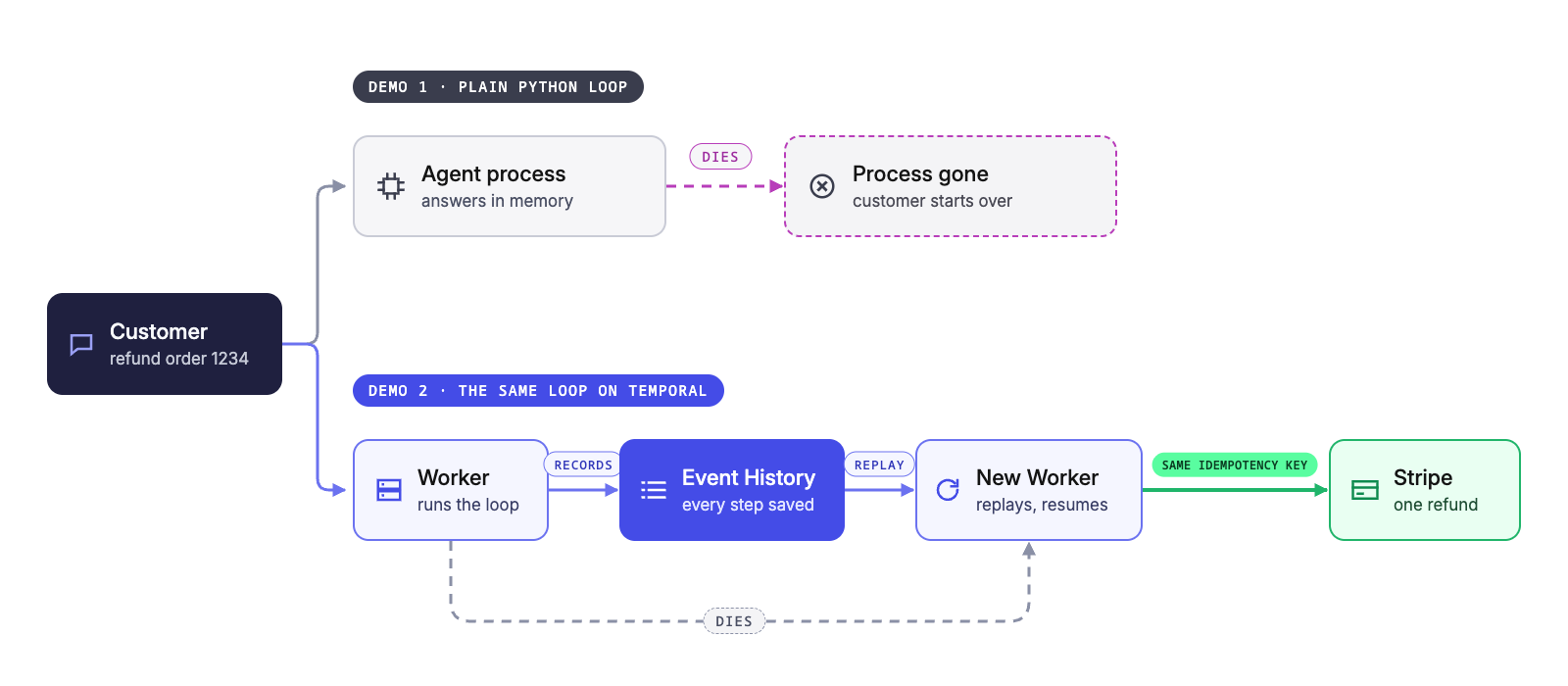
You run one command, uv run refund-demo stage
(stage.py). It runs Demo 1, then starts Demo 2's
Workflow, sends it Signals, and starts and kills its Worker.
- Demo 1 runs the loop in an ordinary Python agent process
(
naive_refund.py). The customer's answers, what the agent observed, and its next step live only in that process's memory, so they die with it. - Demo 2 runs the same loop as the
RefundApprovalAgentWorkflow (workflow.py). A Worker process (worker.py) runs the Workflow and its Activities (activities/), which make the model call (model.py), the lookups (tools.py), and theissue_refundcall (refund.py). - After the kill, a new Worker replays Event History. It runs the Workflow
Definition again from the top, and each Activity that already finished returns its
recorded result instead of running again. That rebuilds
working_memory, and the loop resumes atissue_refund. - Temporal handles every retry. The model and Stripe SDKs' own retries are off, so each retry is an Activity attempt that Temporal schedules and tracks, not a hidden retry inside one SDK call. Event History records each step and its result.
- Every
issue_refundattempt in a run sends the same idempotency key, to Stripe test mode in a live run, or to the offline ledger (fake_stripe.py) with--offline. A refund call that was in flight when a Worker died can run again, and the key keeps that retry from creating a second refund.
The agent loop and its Activities
The loop itself is part of the Workflow Definition. On each turn it calls one Activity to decide
what to do next, and then does it. The agent can run five Activities in the loop, and the Workflow runs a sixth, remember_case, after the refund:
| Activity | What it does |
|---|---|
agent_decide_next_step | Asks the model, or the fixed policy in offline runs, for the next step: ask the customer a question, call one of the lookups, or decide. |
lookup_order | Reads the order the customer wants refunded. |
lookup_customer_history | Reads the customer's past refunds. |
check_refund_policy | Checks whether the order qualifies for a refund. It runs only when the model or the fixed policy asks for it, and the default run doesn't. |
issue_refund | Sends the refund with the run's idempotency key. It's the payment side effect, and it runs only after the decision is to refund. |
remember_case | Saves a short case note for the customer to the demo's SQLite store after the refund. The Workflow ID identifies the note, so a retried write saves it once. |
The customer's answers aren't Activities. They arrive as Signals, and the Workflow waits for each one. Because Event History records each Activity's input and result, a new Worker can replay the loop without calling the model or the lookups again.
The README has the wiring diagram, the loop, retries, the idempotency key, and timeouts in detail.
When you need durable execution
Persisted chat history lets a new process decide again. Durable execution resumes the decision the agent already made.
Durable execution earns its place when the work:
- outlives a process or a deploy,
- waits a long time on people or other systems, or
- retries side effects that are real, such as a refund.
You may not need it when:
- The loop is short and the user is right there. If a run is lost, the user just asks again.
- Redoing a step is cheap and safe. A chat with no irreversible side effects can rely on a session store, and a coding agent's changes live in git.
- Recovery is already handled. Your runtime keeps execution state for you, as LangSmith Deployment, ADK Resume, and DBOS do, or there is a single side-effecting call that you retry right away with the same idempotency key.
Gotchas
Event History grows every turn.
Each turn sends all of working_memory to the model step again, and Event
History records that input every time. The input gets longer with each turn,
so the history grows with the square of the turn count. The server's defaults
allow 2 MB per payload and 50 MB per run. This demo stops at
MAX_TURNS = 10, which keeps it under 7 KB of payloads.
HISTORY_GROWTH.md has the limits, a
measured example, and a
Continue-As-New sketch.
Two fixes: claim check and Continue-As-New
- A claim check handles one big result. Keep the data in your own store and put only a small key in Event History. Temporal's External Storage does this for payloads.
- Continue-As-New handles a long run. It starts a fresh Event History with the same Workflow ID and a new Run ID. Temporal suggests it when the history gets long, and your Workflow Definition makes the call. This demo should roll over only before the refund, because the idempotency key uses the Run ID. A refund attempted in a new run would carry a different key, and Stripe couldn't tell it was a retry.
This demo describes both patterns but doesn't implement them.
A step can run more than once. Replay doesn't redo finished steps, but a
step that was running when the Worker died has no recorded result, so Temporal
runs it again. Give every side effect an idempotency key that the receiving
system checks. issue_refund does this: every attempt in a run sends the same
key, so Stripe makes one refund.
What this demo is not
- Not a production refund service. It leaves out authentication, a production database, a web application, multi-agent orchestration, and hardening. Its lookups read fixtures, and it runs on a local dev server, not Temporal Cloud, with no TLS or API-key options for the connection.
- Not a guarantee that each step runs once. A step that was running when the Worker died runs again, so the refund relies on its idempotency key (Gotchas).
- Not a memory store. Context, memory, and state explains why.
- Not a fix for model quality. Temporal doesn't decide what the agent does or make the model right; evals and guardrails do.
- Demo 1 is not a Temporal Worker. It runs the same decision step with no Temporal and no retry layer, and the screens call it the agent process.
- Not free of trade-offs.
- Event History holds customer data, so plan its retention and add an encryption codec.
- Event History has size limits; see Gotchas.
- Someone has to run the Temporal Service or pay for Temporal Cloud.
- The Workflow Definition must be deterministic and versioned.
- See also when you need durable execution.
Learn more
In the repo. The README covers what this page leaves out:
- Make targets, live-model settings, and cleanup
- Architecture details, source layout, and tests
- Cost to run: measured tokens and dollars, prices, and worst-case estimates
- How other approaches compare: memory layers, framework checkpointers, and DBOS, product by product
- Troubleshooting
- GUIDE.md, the full reference for running the demo, and HISTORY_GROWTH.md on Event History limits
- The code the talk ran is tagged
as-presented-2026-09. The repo is MIT licensed.
Elsewhere.
- Python SDK
- Continue-As-New and External Storage
- Stripe idempotent requests
- For your coding agent: see Develop with AI for Temporal skills and documentation access.