Payload conversion - Go SDK
Temporal SDKs provide a default Payload Converter that can be customized to convert a custom data type to Payload and back.
The order in which your encoding Payload Converters are applied depend on the order given to the Data Converter. You can set multiple encoding Payload Converters to run your conversions. When the Data Converter receives a value for conversion, it passes through each Payload Converter in sequence until the converter that handles the data type does the conversion.
Payload Converters can be customized independently of a Payload Codec. Temporal's Converter architecture looks like this:
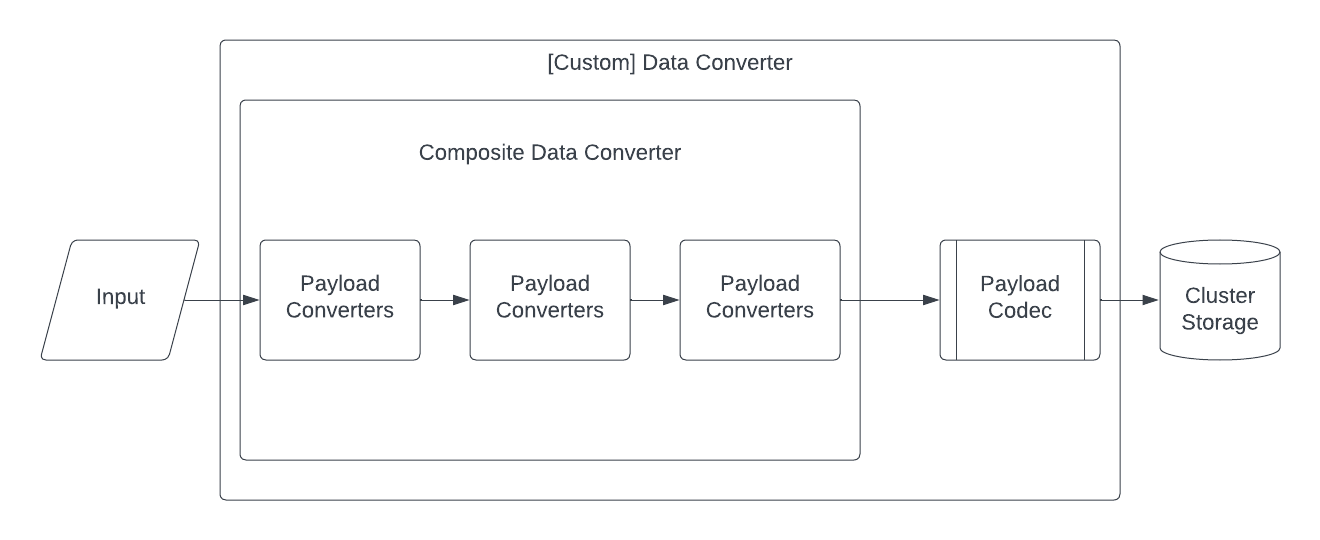
Temporal converter architecture
Use a custom Payload Converter
Use a Composite Data Converter to apply custom, type-specific Payload Converters in a specified order. Defining a new Composite Data Converter is not always necessary to implement custom data handling. You can override the default Converter with a custom Codec, but a Composite Data Converter may be necessary for complex Workflow logic.
NewCompositeDataConverter creates a new instance of CompositeDataConverter from an ordered list of type-specific Payload Converters.
The following type-specific Payload Converters are available in the Go SDK, listed in the order that they are applied by the default Data Converter:
- NewNilPayloadConverter()
- NewByteSlicePayloadConverter()
- NewProtoJSONPayloadConverter()
- NewProtoPayloadConverter()
- NewJSONPayloadConverter()
The order in which the Payload Converters are applied is important because during serialization the Data Converter tries the Payload Converters in that specific order until a Payload Converter returns a non-nil Payload.
To set your custom Payload Converter, use NewCompositeDataConverter and set it as the Data Converter in the Client options.
-
To replace the default Data Converter with a custom
NewCompositeDataConverter, use the following.dataConverter := converter.NewCompositeDataConverter(YourCustomPayloadConverter()) -
To add your custom type conversion to the default Data Converter, use the following to keep the defaults but set yours just before the default JSON fall through.
dataConverter := converter.NewCompositeDataConverter(converter.NewNilPayloadConverter(),converter.NewByteSlicePayloadConverter(),converter.NewProtoJSONPayloadConverter(),converter.NewProtoPayloadConverter(),YourCustomPayloadConverter(),converter.NewJSONPayloadConverter(),)